How to Generate Consistent AI Art Styles
Learn how to maintain a consistent style in AI-generated art using style references, tools, and structured workflows for professional results.

How to Generate Consistent AI Art Styles
Maintaining a consistent style in AI-generated art is essential for creating a strong visual identity, especially for branding or professional projects. Tools like Midjourney’s --sref parameter and Srefs.co’s library of 74,000 style references make this process easier by standardizing elements like color, lighting, and composition. Here’s how to achieve it:
- Use Style References: Style references (
srefs) encode visual details (color, lighting, mood) to ensure uniformity across images. - Midjourney’s
--sref: Add style reference codes to prompts for consistent results. Combine multiple codes for blended styles. - Srefs.co Platform: Access a vast library of styles, organize favorites, and use features like Multiprompt to test styles efficiently.
- Organize a Style Library: Document key elements (color palettes, lighting, techniques) and create templates for future use.
- Avoid Style Drift: Regularly compare outputs to references, use consistent parameters, and reset settings if needed.
The goal is to balance creativity with consistency, ensuring polished, professional results while minimizing unpredictability. Tools like Srefs.co and structured workflows can save time and improve outcomes.
How to Create Consistent Styles in Midjourney
Understanding and Using Style References in AI Art
Style references are a powerful tool for creating consistent AI-generated art. They help maintain a unified look across multiple images by encoding specific visual elements like color, lighting, and composition.
What Are Style References?
Style references, often called srefs, are unique codes that define the visual feel of an image. These codes capture details like color schemes, lighting effects, artistic techniques, and overall mood. Unlike typical prompts that describe what should appear in the image, style references focus on how the image should look.
Think of it this way: when you use a style reference, you're telling the AI, "No matter what the subject is - a cat, a spaceship, or a coffee cup - make sure it fits this particular artistic vibe." Style references act as visual guidelines, ensuring that aesthetic elements stay consistent.
The main advantage of style references is control. Without them, identical prompts can yield wildly different results - one photorealistic, the next cartoonish. Style references eliminate this inconsistency by locking in the artistic style while leaving room for creativity in the subject.
Let’s dive into how you can use these references in Midjourney.
How to Use Style References in Midjourney
Incorporating style references in Midjourney is simple once you understand the syntax. All you need is the --sref parameter to apply a style reference to your prompt.
Here’s the basic structure:
your prompt --sref [style_reference_code]
For example:
a mountain landscape --sref 1234567890
The numbers after --sref represent the specific style reference code.
Want to mix things up? You can combine multiple style references by separating their codes with spaces:
your prompt --sref 1234567890 0987654321
This allows you to blend different styles, though it may take some trial and error to achieve the desired effect.
The --sref parameter works seamlessly with other Midjourney settings. You can still tweak things like aspect ratios, quality, and stylization levels, but the style reference will always influence the final aesthetic.
Now, let’s look at how Srefs.co can make managing style references even easier.
Using Srefs.co for Style References
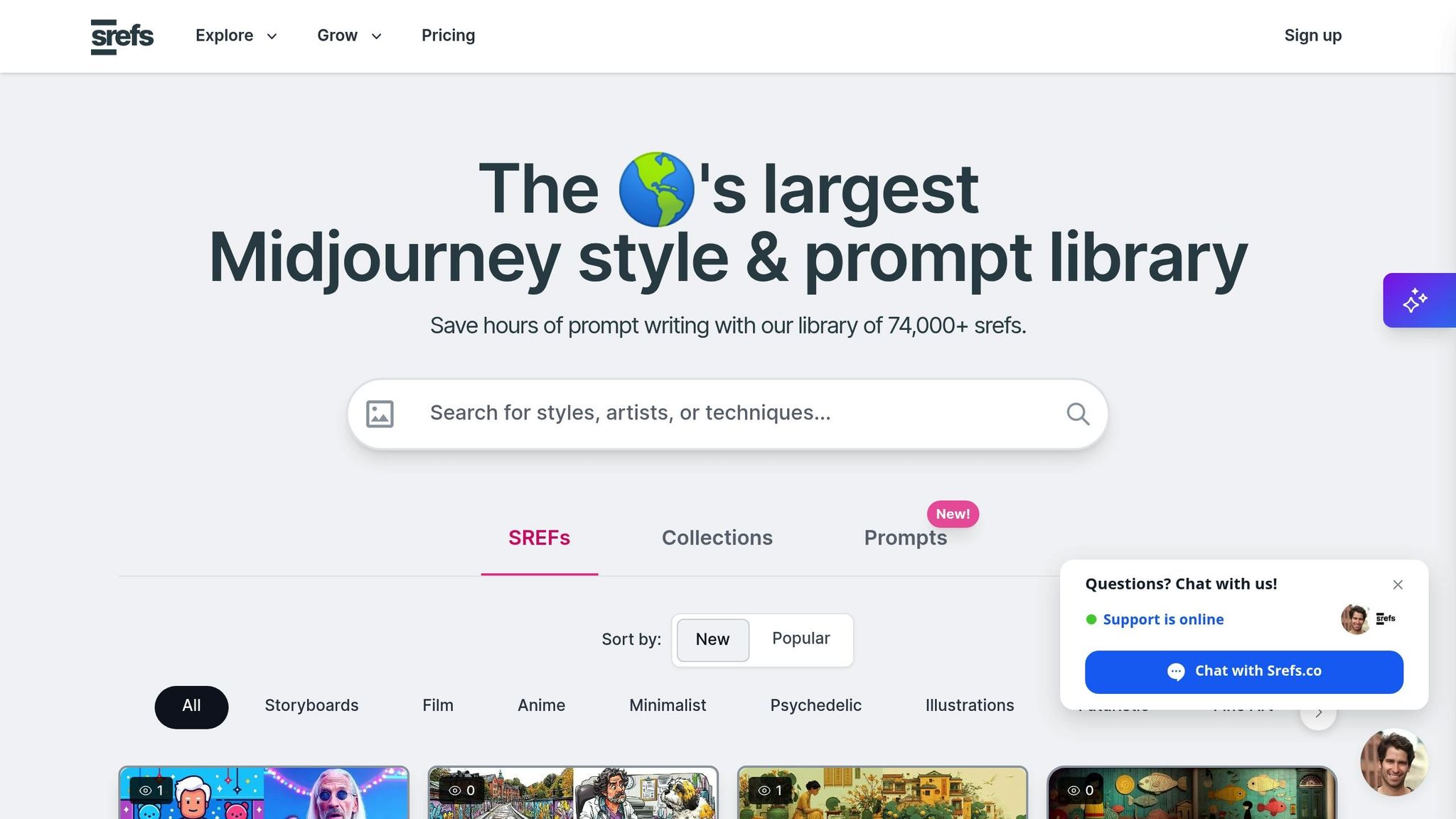
Srefs.co is a platform that simplifies the process of working with style references. It hosts a massive library of over 74,000 style references, making it the largest collection of Midjourney styles available.
The styles are thoughtfully organized into categories like Storyboards, Film, Anime, Minimalist, Psychedelic, Illustrations, Futuristic, Fine Art, and Comic. This organization helps you quickly find the perfect style for your project without endless scrolling.
Srefs.co also offers features to streamline your workflow. You can bookmark your favorite styles, organize them into collections (either private or shared for team projects), and even generate images directly from the platform. This eliminates the hassle of manually copying codes back into Midjourney and keeps your preferred styles easily accessible.
For users with Pro or Lifetime plans, Srefs.co provides additional perks, such as the ability to import your own custom style references. This feature is ideal for artists or businesses that have developed a signature style and want to maintain consistency across various projects.
With tools like these, managing and applying style references becomes a much smoother process.
Building a Workflow for Consistent Style Application
Creating consistent AI-generated art isn’t just about understanding style references - it’s about having a clear, structured process. A systematic workflow helps ensure your artwork maintains a unified look across multiple images. By eliminating guesswork, you can focus on creating a cohesive visual identity while laying the groundwork for an organized style library.
The first step in building this workflow is identifying the key elements that define your style. These include your color palette, lighting atmosphere, composition principles, artistic techniques, and thematic elements. Without proper documentation, style effects can vary unpredictably. By combining these core elements with your style references, you can ensure consistent application across projects.
Think of your workflow as a recipe: document the key prompts, style references, and parameters you use. This step-by-step guide becomes your go-to for maintaining consistency.
Creating and Managing Style Libraries
Once your workflow is in place, the next step is organizing a style library. This library acts as the central hub for all your visual references and techniques, streamlining your creative process. Begin by creating style prompts that serve as templates for your projects. These prompts should include essential style markers like:
- Descriptions such as "minimalist vector illustration"
- Specific color choices like "limited palette of pastel tones"
- Lighting details such as "soft diffused daylight"
- Technical instructions like "high level of detail"
Tools like Srefs.co’s collection features can make organizing these elements easier. Group your references based on project type, mood, or artistic technique to keep everything accessible.
As you build your library, document each style reference thoroughly. Note why a particular reference works, the kinds of subjects it suits, and any parameter adjustments that enhance its effect. This detailed record ensures you can quickly find and apply the right style for any project, saving time and effort in the long run.
sbb-itb-c7ab506
Advanced Methods for Maintaining Style Consistency
Once you've nailed the basics of using style references and set up a workflow, it's time to step things up. These advanced techniques will help you fine-tune your process, ensuring your AI-generated art maintains a cohesive and recognizable style across all your projects.
The secret to mastering style consistency lies in understanding how different elements work together. By blending multiple style references and troubleshooting style issues, you can guide the AI to align more closely with your creative vision - an essential skill for building a professional portfolio or a distinct artistic identity.
Combining Multiple Style References
Using multiple style references allows you to merge different stylistic elements into a cohesive series.
"Runway Gen-4 References is a game-changing feature that gives you much more control over AI-generated visuals by letting you use up to three reference images instead of relying on text alone. Each image becomes a distinct visual instruction the model follows through entity-level encoding, so the AI can recreate details like characters, environments, and artistic styles more consistently across multiple generations." - Shayan Shahzad, ImagineArt
This technique treats each reference image as a unique set of instructions. For instance, one image might dictate brushstrokes, another could set the color scheme, and a third might define lighting. Combining these elements allows you to maintain consistency across characters, environments, and overall style. Imagine blending the textured brushwork of an impressionist painting with the dramatic lighting of a noir film - this approach can produce a style that feels fresh yet cohesive.
You can take this further by selectively applying elements from each reference. Adjusting the influence, or "weighting", of each image ensures your primary style remains dominant, while subtle variations enhance the final look. Pairing clear visual references with detailed written instructions helps the AI merge these elements effectively.
Once you've established your reference combinations, the next challenge is managing style drift as your project evolves.
Fixing Style Drift Issues
Style drift happens when small, unintended changes build up over time, gradually pulling your artwork away from its original style. The key to avoiding this is early detection - regularly compare new outputs to your initial references to spot deviations.
Consistency in technical parameters is just as critical. Stick to the same style reference settings, aspect ratios, and other key parameters throughout your project. Even minor adjustments can lead to noticeable shifts. Using a stable master prompt template for your descriptions can also help maintain uniformity.
The quality of your reference images is another factor. High-resolution, clear images reduce ambiguity, giving the AI less room for misinterpretation. Batch processing with consistent settings can further minimize drift.
If you notice style drift, the best solution is to reset everything - return to your original references and settings rather than trying to fix issues incrementally. This approach helps reestablish the consistency needed for polished, professional results.
Using Srefs.co's Multiprompt Feature for Style Testing
When it comes to maintaining a consistent creative vision, testing different styles effectively is a key step. But let’s face it - evaluating styles one by one can eat up a lot of time. That’s where Srefs.co’s Multiprompt feature comes in. It simplifies the process by letting you apply a single prompt across multiple style references at once, giving you side-by-side comparisons in no time. This tool fits right into your workflow, making style testing faster and more efficient.
How Multiprompt Works
Here’s the gist: Multiprompt takes one text prompt and runs it through several style references simultaneously, delivering instant comparison results. The process is simple. Choose at least one style from Srefs.co’s extensive library of over 74,000 options. Then, input your main text prompt, specify the image size, and fine-tune aesthetic parameters like Stylization, Weirdness, and Variety. These settings let you control how closely the AI sticks to your chosen style references. Be mindful when tweaking these parameters - they can significantly influence the final output.
Choosing the Best Styles with Multiprompt Results
Once you’ve run your prompt through Multiprompt, it’s time to dig into the results and refine your style choices. Start by examining how each style interprets critical aspects of your prompt, such as lighting, color tones, and composition. Look for styles that consistently align with your creative vision.
To take it a step further, test the most promising styles with a few related prompts that reflect the range of content you plan to create. A style that delivers solid results across different subjects while keeping its unique flair is perfect for projects requiring a cohesive look across multiple images.
Keep track of your findings as you go. Documenting your experiments helps you build a reliable library of styles you can turn to for future projects.
The Multiprompt feature is available exclusively with Srefs.co’s Pro plan, priced at $8/month when billed annually, or through the Lifetime Access plan for a one-time payment of $129. These are the only plans that include this feature.
Conclusion: Achieving Consistency with the Right Tools
Maintaining a consistent style in AI-generated art hinges on having the right tools and a well-thought-out workflow. The strategies we've discussed - ranging from understanding style references to organizing libraries - help tackle one of the toughest hurdles in AI art: ensuring visual harmony across multiple pieces.
The secret to success lies in structured experimentation and thorough documentation. By testing and recording style combinations, you can turn what might feel like random trial and error into an efficient, repeatable process.
Tools like Srefs.co's style library provide a solid starting point, but the standout feature is their Multiprompt tool. This feature allows you to see how a single prompt plays out in multiple styles at once, cutting down the tedious task of generating images one at a time. It empowers you to make quick, informed decisions about which styles work best for your project.
Investing in tools like these not only saves time but also elevates your creative output. Whether you're curating a cohesive Etsy shop or building a portfolio with a distinct aesthetic, Multiprompt's advanced capabilities help transform casual attempts into polished, professional results. Combined with a well-organized workflow, these tools strengthen the unified visual identity we've emphasized throughout this guide.
It's also important to note that consistency doesn't mean being rigid. As we've explored earlier, the most skilled AI artists strike a balance between sticking to their chosen style and adapting when subtle variations are needed. With the right tools and processes, you can achieve that balance while maintaining a strong, consistent visual identity.
Keep refining your style, test it across different subjects, and expand your documented library to ensure the coherence we've outlined. Consistency in AI art grows from a foundation of careful experimentation and thoughtful planning.
FAQs
How can I create AI-generated art with a consistent style across multiple projects?
To create a consistent style in your AI-generated art, start by crafting detailed prompts that specify essential elements like the color palette, lighting, and artistic style. Reusing these descriptors across your projects helps build a unified and recognizable aesthetic.
Another effective approach is to use style references - these could be example images or pre-set visual themes that guide the AI's output. You can also try tools that offer customization options, like tweaking parameters or training custom models, to better match the results to your vision. To achieve the best outcomes, stick to a clear and steady workflow throughout your projects.
What are the advantages of using multiple style references in AI art, and how can I combine them effectively?
Using multiple style references in AI-generated art opens up exciting possibilities for creating a distinct visual identity, maintaining a consistent look across a series of images, and experimenting with blending different artistic influences. This method is particularly useful for artists, designers, and creators aiming to craft a signature style or develop cohesive visual assets for projects like portfolios or online stores.
To make the most of this technique, try incorporating multiple styles or themes directly into your prompts. Additionally, leverage tools that let you blend reference images seamlessly. This approach allows you to strike a balance between various influences while keeping the overall aesthetic consistent. By fine-tuning your prompts and testing different combinations, you can achieve greater creative control and produce AI-generated artwork that aligns perfectly with your vision.
How does the Multiprompt feature on Srefs.co help create and test consistent AI art styles?
The Multiprompt feature on Srefs.co streamlines the process of crafting and testing consistent AI art styles by allowing you to blend multiple styles within a single prompt. This approach lets you explore and compare various aesthetics side by side, helping you fine-tune your results without needing to start over each time.
With the option to use predefined styles or your own custom references, you can ensure a uniform look across different images and projects. This tool is a game-changer for artists, designers, and creators who want to create polished visual assets efficiently - whether it’s for client projects, online stores, or personal portfolios.

Alex Chen
AI art enthusiast and digital creative with over 5 years of experience in generative art. Passionate about exploring the intersection of technology and creativity.
4 articles


