What Are Style References in AI Art?
Style references in AI art guide aesthetics like color, texture, and lighting without copying subjects. In Midjourney, you can apply them with --sref, mix multiple styles, and control influence using --sw. Tools like Srefs.co make it easy to find and organize thousands of curated styles, helping you create consistent, professional results.

• 17 min read

What Are Style References in AI Art?
Style references in AI art are visual guides that help AI tools replicate specific artistic styles. Instead of copying objects or subjects, these references focus on aesthetic features like colors, textures, lighting, and mood. For example, you can use a Van Gogh painting as a reference to create a modern cityscape with similar brushstrokes and color tones.
Key Points:
- Purpose: Style references ensure consistent, polished results by guiding AI tools like Midjourney in applying specific visual styles to images.
- How It Works: A text prompt defines the subject (e.g., a mountain), while the style reference shapes its look (e.g., watercolor painting).
- Control: Parameters like
--swadjust the strength of the style's influence, offering flexibility in blending references with the subject. - Applications: Useful for branding, client projects, and creating unified visual themes across multiple artworks.
Tools like Srefs.co simplify finding and managing style references, offering access to over 74,000 curated styles. By combining references or tweaking style weights, users can achieve precise results tailored to their needs.
How Style References Work in Midjourney
Using Style References in Midjourney
Getting started with style references in Midjourney is straightforward, though the steps vary depending on whether you're using the web interface or Discord.
On the Midjourney web interface, you have two main options:
- Upload or select an image: Click the image icon to upload or choose an existing image, then drag and drop it into the Style Reference section. You can use local files directly here.
- Use SREF numbers: If you’re browsing styles in the Midjourney webapp, you’ll see unique style reference numbers. You can apply them directly in your prompt using the
--sref <sref_number>parameter, without needing to provide an image URL.
For Discord users, style references work a bit differently. Add the --sref parameter at the end of your prompt, followed either by an image URL or by a style reference number from the webapp. If you want to use a local image, you’ll first need to upload it to Discord to generate a URL. Examples:
/imagine your prompt here --sref <IMAGE_URL>
/imagine your prompt here --sref <SREF_NUMBER>
Want to mix multiple style references? Just list multiple image URLs (or --sref numbers) after the --sref parameter,
separating them with spaces. Midjourney will blend the styles to create a unique aesthetic. You can even assign
specific weights to each reference by appending :: followed by a number, like this:
--sref URL1::2 URL2::1 URL3::1
This lets you control how much influence each style has. Style references also work seamlessly with other features like Character References, Omni References, and Image Prompts.
Now, let’s explore how these references influence the final image.
How Style References Affect Images
Style references in Midjourney focus entirely on visual elements - think colors, textures, lighting, and medium - while ignoring specific objects or subjects in the reference image. For instance, if you use a watercolor painting of flowers as your style reference but prompt for a "mountain landscape", the result will feature mountains rendered in the soft, flowing style of a watercolor painting, without any floral elements.
This flexibility allows you to mix and match styles creatively. You could pair dramatic film noir lighting with a fantasy scene or apply the bold brushstrokes of an abstract painting to a portrait. To get the best results, keep your prompts simple and avoid adding style-related terms that might conflict with your reference image's aesthetic.
Changing Style Weight Settings
The style weight parameter (--sw) gives you control over how much influence your style reference has on
the final image. This parameter ranges from 0 to 1,000, with the default set at 100. Lower values (like
--sw 50) create a more subtle effect, gently guiding the image's look without overpowering it. Higher
values (such as --sw 300 or --sw 500) make the style reference more dominant.
To adjust this setting, include the --sw parameter in your prompt. For example:
/imagine a serene lake at dawn --sref <STYLE_IMAGE_URL> --sw 200
In Midjourney V7, style references respond even more strongly to the --sw parameter, so
you may need to tweak values to get the desired effect.
| Parameter | Range | Default | Purpose |
|---|---|---|---|
--sw |
0–1,000 | 100 | Adjusts the strength of a style reference's influence. |
For even more control, you can combine --sw with the image weight parameter (--iw), which
adjusts how much influence a content image has. Here's an example:
/imagine <STYLE_IMAGE_URL> --sw 200 <CONTENT_IMAGE_URL> --iw 0.5 a serene lake at dawn
In this case, the style reference takes center stage with a strong influence, while the content image plays a more
subtle role. Keep in mind that the --sw parameter affects the overall influence of all style
references, whereas the :: syntax lets you fine-tune the balance between individual style sources.
Finding and Managing Style References
How to Find Good Style References
Choosing the right visual sources is key to creating consistent and compelling AI-generated art. The best style references combine high quality, distinctiveness, and legal clarity. Look for high-resolution images with clear visual elements - think bold colors, unique textures, or distinctive techniques.
Public domain artwork is a great starting point. Classic paintings from museums, vintage illustrations, and historical photographs offer rich stylistic features without copyright concerns. Art movements like Art Nouveau, Bauhaus, or mid-century modern design boast strong visual identities that translate beautifully into AI-generated imagery.
Your own creations, whether sketches, paintings, digital art, or photographs, can also serve as valuable references. These personal works not only reflect your artistic vision but also help you establish a consistent style across projects.
When evaluating potential references, focus on images with a clear and recognizable visual identity. Avoid cluttered compositions where stylistic elements are hard to discern. The most effective references highlight distinct features like dramatic lighting, vibrant colors, specific brush techniques, or unique textures.
If you're looking for a more streamlined way to find curated styles, tools like Srefs.co can simplify the process.
Using Srefs.co for Style References
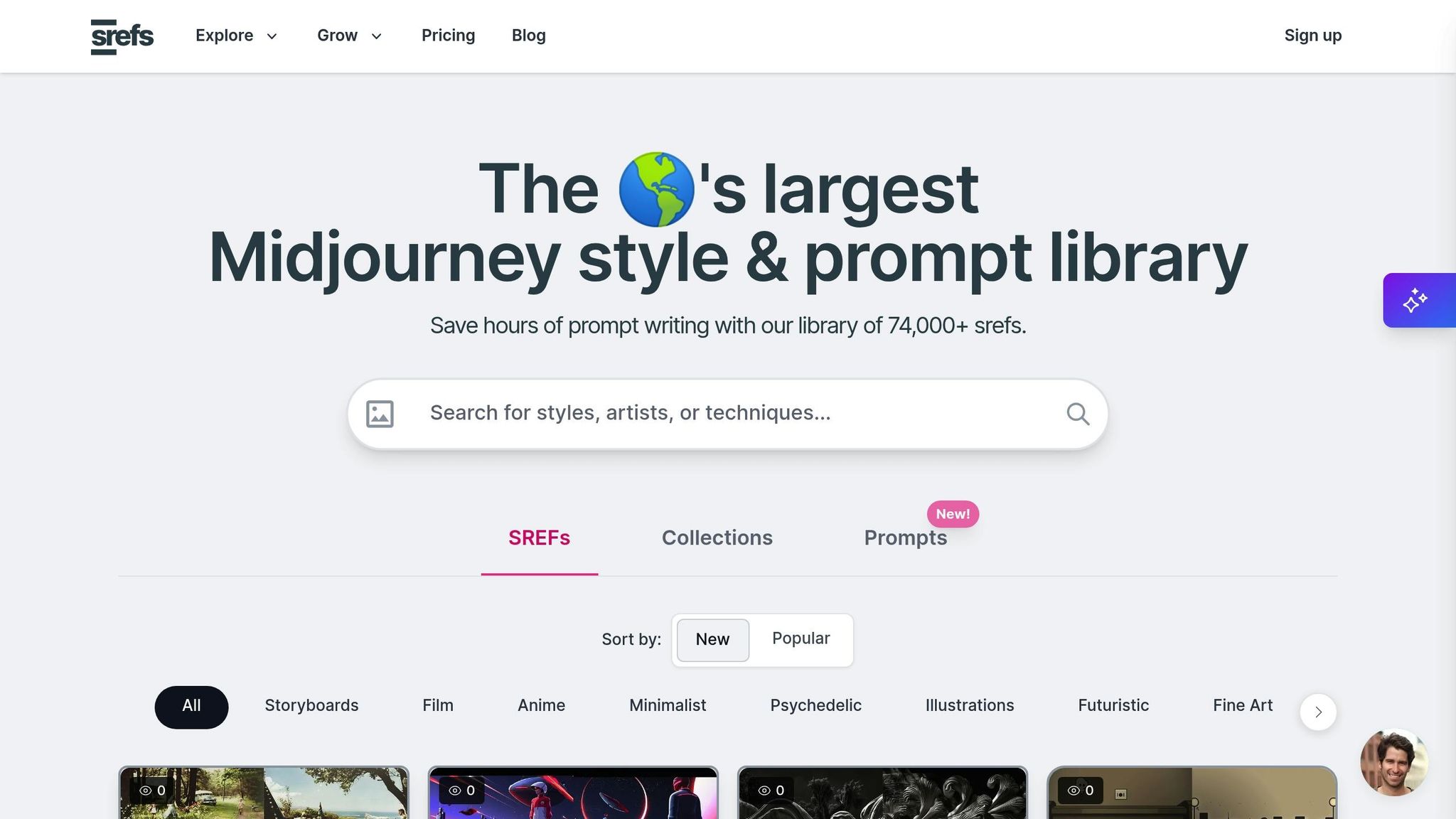
Srefs.co offers a massive library of over 74,000 Midjourney style references, making it a one-stop resource for finding the perfect visual inspiration. Instead of hunting through scattered sources, you can quickly locate styles tailored to your needs.
The platform’s search tools let you explore styles using text descriptions or image uploads. The image search is particularly handy when you have a concept in mind but struggle to put it into words.
To keep your workflow organized, Srefs.co allows you to save styles to your "Saved Styles" collection using a simple bookmark icon. It also categorizes styles into themes like anime, fantasy, retro, abstract, and photographic styles, giving you access to a wide range of aesthetic options.
For projects requiring confidentiality, Srefs.co lets you mark collections as private, ensuring your creative assets stay secure.
Managing Custom Style References
While curated libraries are helpful, custom style references can take your creative process to the next level. With Srefs.co’s Pro plan, you can import and manage your own references, blending external inspiration with your unique artistic vision.
Organize your collections based on project type, client, or aesthetic theme. For example, you might create separate folders for "Corporate Branding", "Editorial Illustrations", or "Product Photography Styles." This system saves time and keeps your workflow efficient.
As your style evolves or client needs shift, version control helps you stay organized. Use clear, descriptive names and date-stamp collections to track changes over time.
Regular updates are essential. Remove outdated references and add new ones that align with your current goals. A smaller, well-curated collection is far more effective than an unorganized library.
Finally, ensure your references are accessible across devices. While platforms like Srefs.co handle cloud backups automatically, keeping local copies of key references provides extra security for critical projects. This dual approach ensures your creative assets are always within reach.
Practical Uses of Style References
Creating Consistent Visual Themes
Style references play a key role in maintaining a cohesive look across branding and digital projects. By sticking to one style reference and applying it consistently to all images in a series, you can ensure a unified visual identity.
Start by creating an initial image that captures your desired style. Use its URL or the generated sref code with the
--sref parameter in future prompts to replicate its visual elements - like color schemes, lighting,
textures, and artistic techniques - across your collection. Keep your prompts straightforward, clearly separating
subject and style, to avoid clashes with your intended aesthetic.
For added flexibility, the --sw parameter lets you adjust the intensity of the style reference, making
it easier to tailor the same aesthetic to different project needs while still keeping a consistent look.
Combining Multiple Style References
Once you've established a consistent theme, combining multiple style references can open the door to even more
creative possibilities. Midjourney allows you to mix several style references by entering their URLs separated by
spaces and assigning weights using the format --sref URL1::2 URL2::1. This approach can produce effects
that wouldn't be possible with a single reference.
Tools like Srefs.co's Multiprompt feature simplify this process by enabling you to test multiple style combinations at once. This not only saves time but also helps uncover unexpected blends that work beautifully together.
For best results, begin with styles that share common traits, such as similar color tones, complementary textures, or related artistic movements. This approach often yields more harmonious outcomes than mixing drastically different aesthetics. Keep a record of successful combinations and their parameters for easy replication in future projects.
Improving Workflow for Client Projects
Style references aren’t just for creative exploration - they can also streamline workflows for professional projects. Organize style collections by themes tailored to specific clients or project types, such as "Corporate Clean", "Vintage Editorial", or "Modern Product Photography."
If you're feeling creatively stuck, use --sref random to explore new aesthetics. Save the generated
numerical codes for styles that align with your project goals. Present clients with 3–4 style variations to speed up
approvals and minimize revision cycles.
To stay organized, adopt clear naming conventions and document successful combinations. Note which styles work best for specific scenarios, like headshots, product photography, illustrations, or environmental shots. This kind of documentation is invaluable when scaling your workflow or onboarding new team members, ensuring they can quickly align with established client preferences.
sbb-itb-c7ab506
Midjourney Style Reference (--sref): Everything You Need To Know (Literally)
Style Reference Tools and Versions in Midjourney
Let’s dive into the advanced tools and version controls that help refine and manage styles in Midjourney.
Using Style References in Midjourney
Midjourney allows you to apply style references by using specific parameters that integrate visual styles directly
into your output. This builds on the earlier discussion about adjusting style weights, ensuring you can fine-tune
the influence of your chosen style. The --sw parameter remains the key tool for controlling the
intensity of a style's impact.
Srefs.co Features for Managing Style References
Srefs.co offers a massive library of over 74,000 style references, making it a go-to resource for exploring and managing styles in Midjourney. You can browse styles sorted by "New" or "Popular" and filter them into categories like Storyboards, Anime, Film, Minimalist, Psychedelic, Illustrations, Fine Art, Futuristic, and Comic.
One standout feature is the Multiprompt tool, which lets you test multiple style references at once. This not only saves time but also conserves your Midjourney credits. Additionally, Srefs.co includes tools for organizing styles into custom collections. You can even keep these collections private if you prefer to use them for personal projects.
Each style on Srefs.co is assigned a numerical sref code, simplifying the process of applying detailed style descriptions. These features work seamlessly with Midjourney's existing functionality, giving you more control over your creative process.
Tools and Versions Comparison
Here’s a quick comparison of the features offered by default Midjourney tools and the various Srefs.co plans:
| Feature | Default Midjourney | Srefs.co Hobby ($6/month) | Srefs.co Pro ($8/month) | Srefs.co Lifetime ($129) |
|---|---|---|---|---|
| Library Access | Manual collection required | 74,000+ styles | 74,000+ styles | 74,000+ styles |
| Organization Tools | Basic Discord saves | Unlimited collections | Unlimited collections | Unlimited collections |
| Multi-style Testing | Manual prompt variations | Not included | Multiprompt feature | Multiprompt feature |
| Custom Import | Native --sref support | Not available | Import custom srefs | Import custom srefs |
| Support Level | Community Discord | Basic support | VIP support | VIP support |
| Ideal Use | Simple style application | Style discovery and basic organization | Professional workflows with custom styles | Long-term users needing full features |
Note: Pricing and feature details are based on information from Srefs.co. All sref codes are compatible with the latest Midjourney models.
Conclusion
Key Points
Style references have transformed the way AI art is created, particularly with Midjourney, by providing a way to shape and refine its visual aesthetic. This flexibility proves especially useful for maintaining brand consistency in professional projects or crafting cohesive themes for personal endeavors.
The --sw parameter allows for precise control over how much influence a style has, blending curated inspirations with custom inputs to create a unified art strategy.
Using style references effectively can simplify your workflow. Platforms like Srefs.co, which offers access to over 74,000 curated styles, provide endless inspiration for creative projects. Tools such as Multiprompt not only save time but also conserve Midjourney credits by enabling simultaneous testing of multiple styles.
For professionals, the ability to import custom styles and organize collections enhances productivity. Whether you're designing digital art for platforms like Etsy, crafting marketing materials for clients, or exploring new creative directions, style references offer the consistency and precision that traditional AI prompts often lack.
By integrating these tools and techniques, you can elevate your projects and achieve higher-quality creative results.
Begin Using Style References
To make the most of style references, dive in and experiment. Start by exploring the extensive library on Srefs.co, where you can find styles that align with your artistic goals. Play around with combining different references, tweaking style weights, and building personalized collections of your favorite styles.
For those working on client projects or requiring advanced features, upgrading to a Pro plan might be worth considering. At just $8 per month, this small investment can lead to significant time savings and better results for your clients.
Keep in mind that the key to success lies in understanding the specific needs of your project. Experiment with different style combinations and fine-tune the weight settings to consistently bring your creative vision to life.
FAQs
How do style references improve the quality and consistency of AI art?
Style references are an essential tool for refining the quality and consistency of AI-generated art. They act as a visual guide, helping the AI model grasp and replicate specific artistic styles. This ensures that the resulting images share a unified and harmonious look, even across a series.
For artists and creators, style references are invaluable. They make it possible to establish a distinct aesthetic, control how different styles merge, and create visually consistent images. This is especially useful for projects like branding, client commissions, or crafting unique digital prints for online platforms. Simply put, style references are key to producing polished, professional AI-generated artwork.
What are the advantages of using Srefs.co to manage style references in Midjourney?
Using Srefs.co to handle style references in Midjourney comes with some serious perks. With a massive library boasting over 74,000 style references, creators can quickly pinpoint and apply the artistic styles they need. This not only saves time but also makes the creative process a whole lot smoother.
What’s more, Srefs.co includes AI-powered search and categorization tools. These features make it easy to find styles that align perfectly with your creative vision while ensuring consistency throughout your projects. This efficient setup allows artists, designers, and digital creators to deliver polished, cohesive, and visually striking work without unnecessary hassle.
What does the style weight parameter (--sw) do in AI art, and how does it affect the final image?
The style weight parameter (--sw) in AI art plays a key role in defining how much the
style of a reference image shapes the final artwork. When you set a higher --sw value (up to
1,000), the generated piece will closely mirror the reference image's colors, textures, and overall vibe. On the
flip side, lower values dial down this influence, allowing the output to drift further from the reference and
embrace more creative variation.
This parameter is an essential tool for striking the right balance between maintaining style consistency and exploring artistic freedom. It empowers creators to fine-tune their results, whether they're working on cohesive branding, designing custom prints, or crafting one-of-a-kind digital art pieces.
Chloe Bennett
Chloe Bennett writes about the future of creativity, where art meets artificial intelligence. With a background in graphic design and a deep curiosity for emerging tech, she focuses on how tools like MidJourney and Srefs.co empower designers to bring bold ideas to life. On the Srefs.co blog, Chloe explores AI art styles, prompting strategies, and real-world workflows, always with an eye toward making complex tools accessible and inspiring. Her approachable style helps both beginners and professionals discover new ways to stay consistent, creative, and efficient in their design projects. Outside of writing, Chloe loves experimenting with digital illustration, exploring new art trends, and sharing inspiration with fellow creators.
4 articles


